Use Poker Assistant
Analyze your hands
Import a session from PokerStars, GGPoker, 888poker, Winamax or iPoker and find the hand that cost the most.
You can import a session and pick the one hand worth an hour of study.
- A hand history exported from PokerStars, GGPoker, 888poker, Winamax or iPoker.

Before you start
Analyze reads a hand history from PokerStars, GGPoker, 888poker, Winamax or iPoker: paste one hand as text, or bring in a file exported from the client’s own history folder. Folder import, which points the app at that whole folder at once, only runs on macOS. A hand from a table size or stake the loaded solutions do not cover still imports; it lands unsupported instead of graded, since there is no solved cell to grade it against.
Import a session
- Click Import hand on the Analyze screen. Paste, File and Folder sit as separate tabs across the top.
- Match the tab to what you have. Paste takes one hand’s text; File takes exported files one at a time; Folder, on macOS only, takes a whole history folder at once.
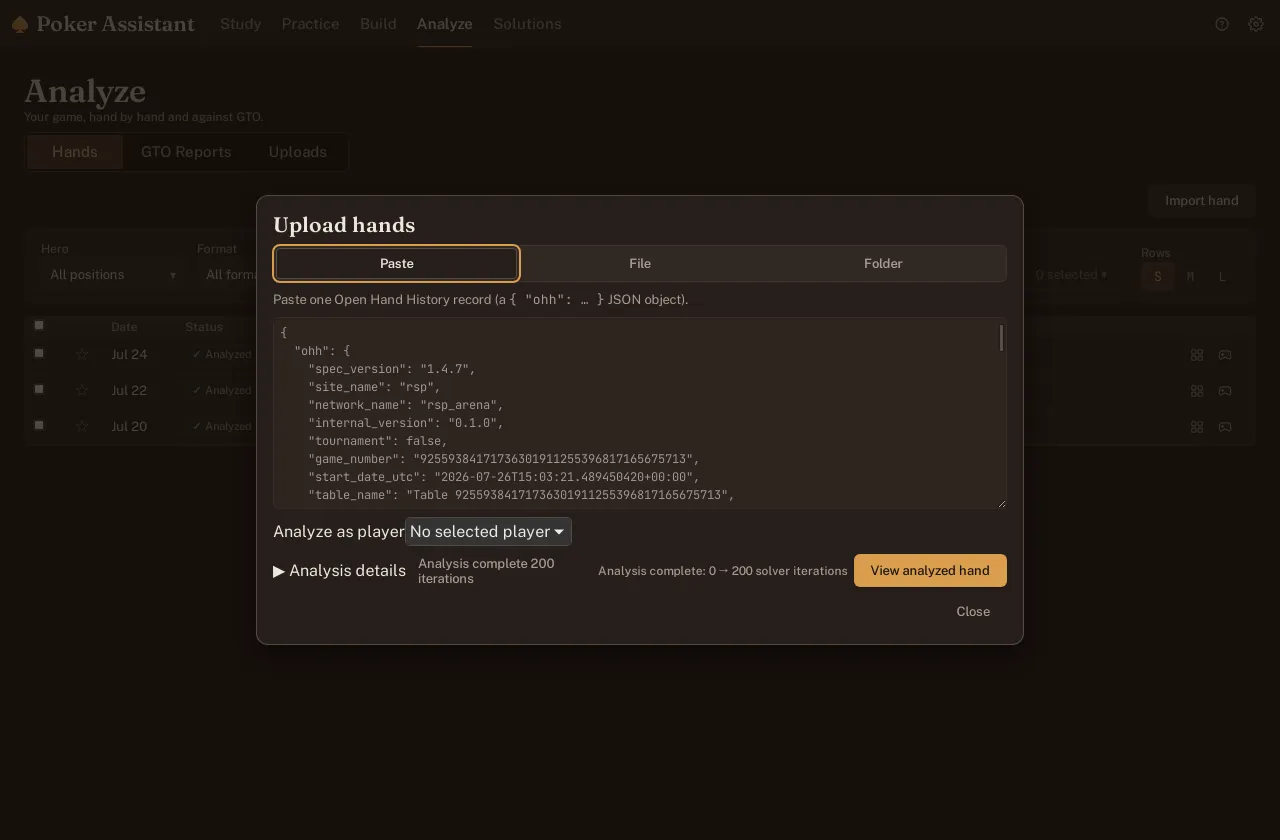
- Watch the counters while the batch runs. Total, analyzed, duplicate, unsupported and error each update live as every hand lands, so a thousand-hand folder never leaves you staring at a frozen screen.
- Read the message on any row that fails. A hand from a site outside those five does not import, and the row names the reason instead of failing silently into the error count.
A hand repeated inside the same batch, the same site and game seen twice in one folder, counts once as a duplicate rather than landing in the list twice.
Sort by what it cost
- Click View on a finished batch to open its hands in the list.
- Click the EV loss column to sort the list worst first, so the hand that cost you the most sits at the top.
- Scan the Site and Format columns before you open anything. A pattern that repeats across many rows is worth noticing on its own, beyond whatever sits at the top.
Open the hand
- Click a row to open it in the replayer.
- Step through the hand action by action. Every scored decision, preflop and postflop, carries the same five-tier grade the trainer uses, so a Blunder here reads exactly like one you played yourself in Practice.
- Read the numbers on the street where your play parts ways from the solver’s: your action’s frequency in the solved mix, the solver’s own top play, and the EV difference between the two.

- Click the jump-to-Study icon in the toolbar to open that exact spot in Study, where the full grid and ladder replace the single line the replayer shows.
Compare your stats with the solver’s
- Open GTO Reports once enough hands are in to trust the sample. The table runs from VPIP through 5-bet frequency, position by position, well past the two headline numbers.
- Read the VPIP and PFR columns first. Each one lines your figure up beside the solver’s for that same spot, with a flag on any reading built from too few hands to mean much yet.
- Switch the absolute and relative toggle to change what the table leads with: absolute shows your raw number next to the solver’s, relative drops the raw figure and puts the gap between them front and center.
- Click a flagged cell to jump straight to the hands behind it, so a number that looks off arrives with the decisions that produced it.
Read the result
The biggest EV loss on the list is not always the hand worth an hour, and a river two-outer is why: it costs real money and teaches nothing, since the decision was sound and the card fell the wrong way. Look instead for the biggest EV loss on a line you would play exactly the same way again tomorrow. That decision repeats every time the spot comes up, which makes it the one a session of study can actually fix.
A cooler and a leak can carry the same EV number and mean opposite things. GTO Reports is what tells them apart: a stat that sits close to the solver’s across many hands says the decision was fine and variance did the rest; a stat that drifts wide and stays there points back to the hand list you already sorted.